 BUILDS THE CAPABILITY
Production AI, immersive VR, robotics and simulation.

 PROPOSAL FOR THE SAFFARINI FAMILY
AI INTEGRATION · OFFICE TO SITE
OneBonsai Gulf adds specialist AI, digital communications, immersive training and field robotics to Saffarini's existing workflows and systems.
 WHO WE ARE · WHY THE FIT IS PRACTICAL
BELGIUM CAPABILITY · UAE DELIVERY · SAFFARINI WORKFLOWS
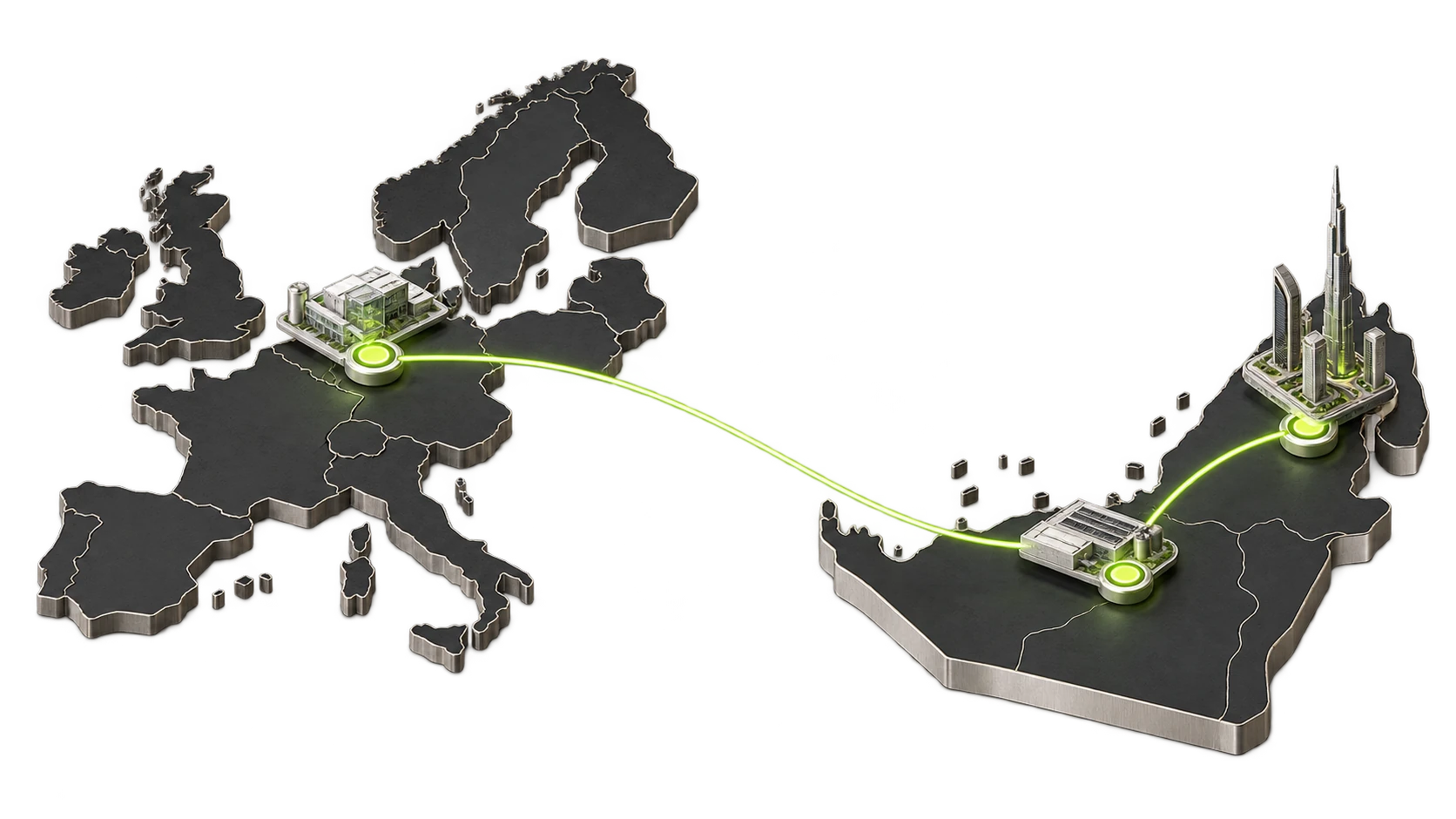 BUILDS THE CAPABILITY
Production AI, immersive VR, robotics and simulation.
 MAKES IT WORK IN THE UAE
Advises, integrates, deploys and helps teams operate it.
 PUTS IT INTO REAL PROJECTS
Design, contracts, tendering, permits and supervision.
PUBLISHED REFERENCE WALL · ONE PAGEORGANIZATIONS SHOWN ON ONEBONSAI.COM
 PART ONE · HEADQUARTERS
SECTION 01
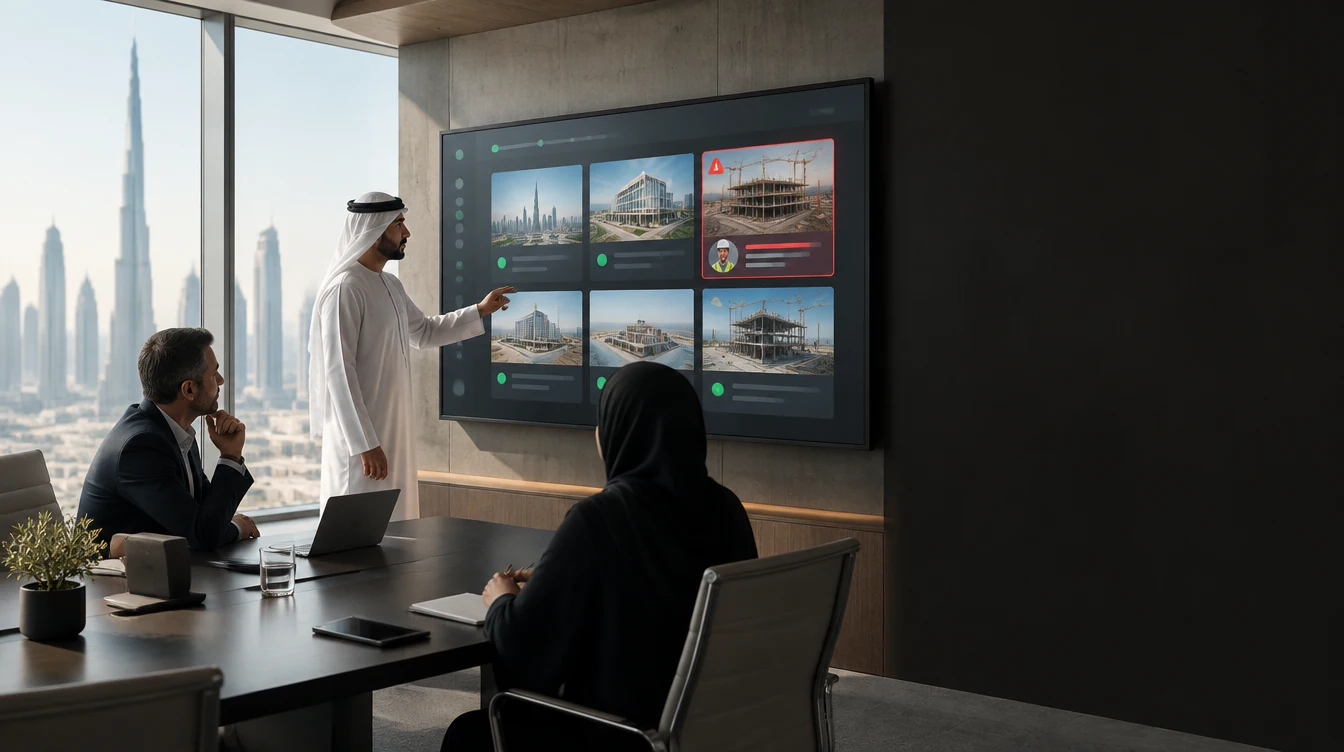
01One specialist agent per department. Each prepares the work; a named person keeps the decision.
HQ ADMINISTRATION · AI AGENTSHEADQUARTERS · ONE SPECIALIST AGENT PER TEAM
Each agent reads only approved sources, prepares one decision and records the final human action.

 PART TWO · THE SAFFARINI TIMES
SECTION 02
02Every morning, one written report of everything done in the company. Read it, or have it read to you.
AI AGENT 01 · FINANCE · THE STEP UPTHE SAME MOVE THE LARGE CONTRACTORS HAVE MADE
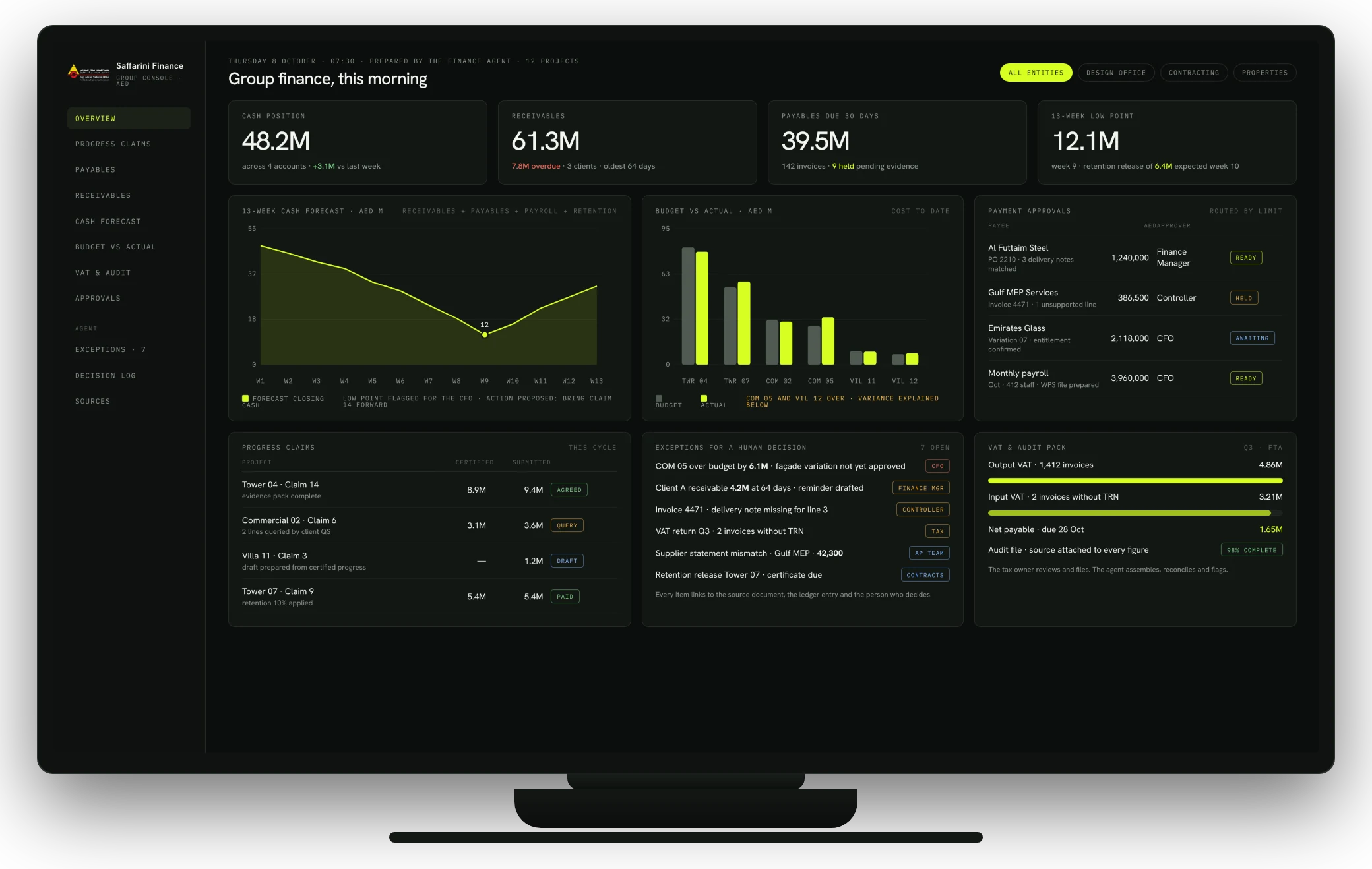
AI AGENT 01 · FINANCE · WHAT THEY GETTHE FINANCE CONSOLE · EVERY MORNING AT 07:30
One screen prepared by the agent before the day starts: cash, receivables, payables, the 13-week forecast, claims, approvals and the exceptions that need a person.
CASH TODAY, NOT MONTH-ENDPosition across accounts, with the forecast low point already flagged
CLAIMS AND APPROVALS IN ONE QUEUEEach item routed to the right approver with the evidence attached
EXCEPTIONS ONLYSeven items need a decision; the other 1,400 lines were matched and filed
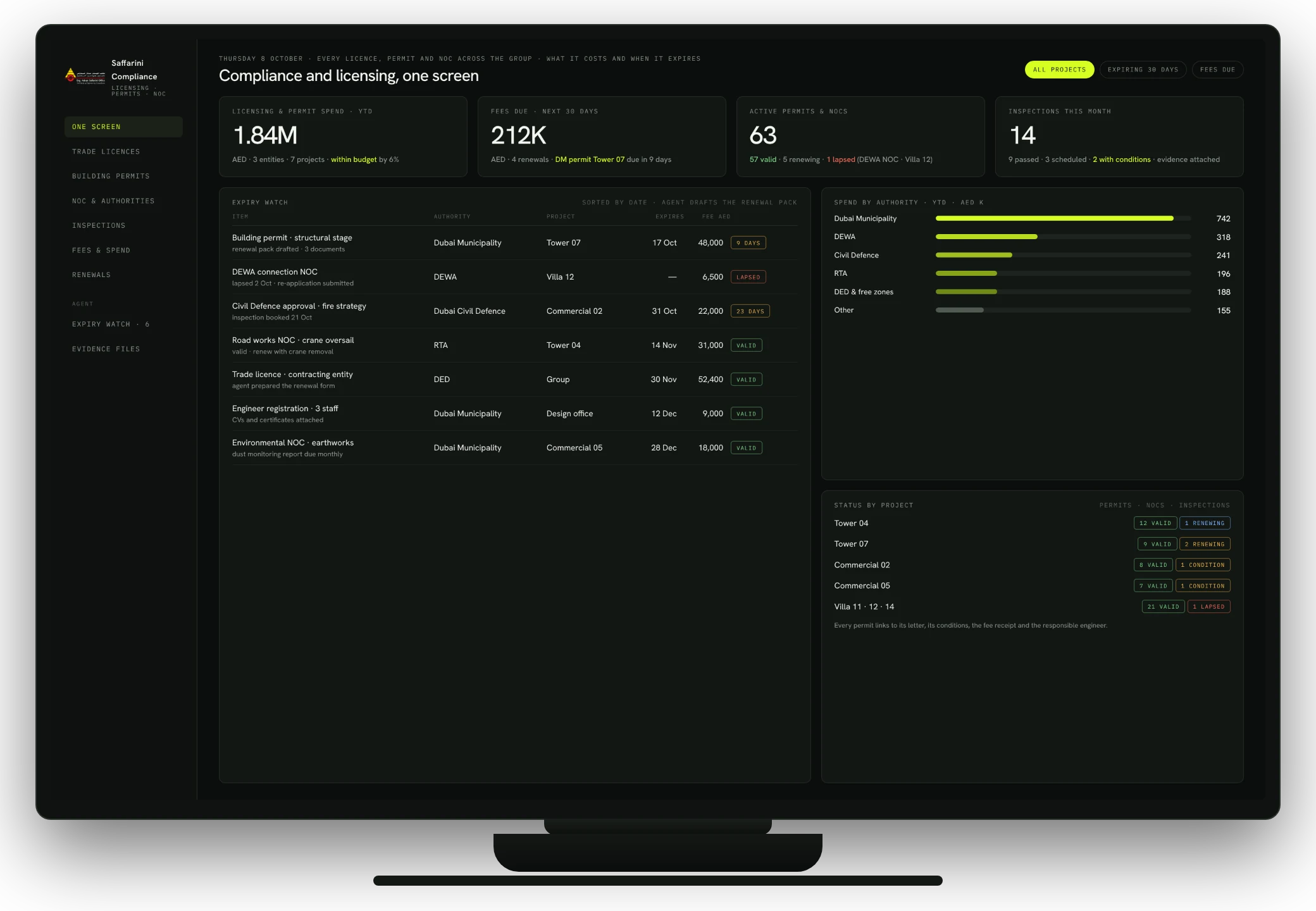
 AI AGENT 03 · LEGAL & COMPLIANCE · ONE SCREEN
LICENSING · PERMITS · NOCS · INSPECTIONS · FEES
Trade licences, building permits, authority NOCs and inspections across every entity and project, with what each costs, when it expires and who is responsible.
EXPIRY WATCHThe agent drafts the renewal pack before the date, never after
SPEND IN VIEWLicensing and permit fees year to date, by authority and by project, against budget
NOTHING LAPSES QUIETLYA lapsed NOC is visible to leadership the same morning, with the fix in motion
 REPORTING FOR HQ · EVERY MORNING
THE FULL WRITTEN REPORT · ONE PAGE · APPROVED SOURCES ONLY
The HQ agent collects every finished action from finance, HR, legal, projects, operations, safety and communications, removes duplicates, links each item to its owner and evidence, and writes the morning edition before leadership arrives.
AED 2.3M approved against certified progress. One unsupported delivery note returned to the supplier.
OWNER · FINANCE CONTROLLERExpiring certificates renewed before the shift. Roster for Site 04 confirmed compliant.
OWNER · HR MANAGERField evidence matched the programme. Next affected activity flagged for recovery.
OWNER · PROJECT MANAGERGuardrail restored, supervisor check recorded. Repeat pattern sent to the training queue.
OWNER · SITE H&S LEAD14actions closed across seven departments
3decisions waiting for leadership
1site risk closed with proof
2tenders moved to the next stage
ILLUSTRATIVE EDITION · COUNTS AND ITEMS ARE EXAMPLESREPORTING FOR HQ · VOICE MODETHE SAME REPORT · SPOKEN
On the drive in or between meetings, the executive asks for the two-minute summary, the full reading, or one department. The voice model reads only the approved morning edition.
Good morning. Yesterday the company closed fourteen actions across seven departments.
Finance approved the certified invoice pack and held one unsupported line.
Site 04 verified the level eighteen slab and closed the open-edge finding with proof.
 PART THREE · THE LIFECYCLE
SECTION 03
03From opportunity to handover: one intelligence layer across the organisation, and the product family behind it.
SAFFARINI AI OPERATING SYSTEMTHE COMPLETE OPERATING LIFECYCLE
Opportunity, tendering, design, delivery, handover and external communication remain distinct workflows. Approved information connects them.
PHASE ZERO · 4 TO 6 WEEKSAI READINESS AND PROCESS DISCOVERY
We document each input, decision, owner, system and bottleneck across office, design and project delivery.
PROCESSHow work moves today
DATAWhere approved information lives
CONTROLWho may access and approve it
ENTERPRISE KNOWLEDGE · BUSINESS DEVELOPMENTPAST WORK BECOMES USABLE AGAIN
The private knowledge layer searches authorised projects, tenders, specifications, reports, correspondence, CVs and lessons learned.
“Show healthcare projects above AED 500 million, the methods used and the relevant team references.”
The same evidence supports client briefs and Bid, No Bid or Investigate recommendations.
THE PRODUCT FAMILY · BUILT AROUND SAFFARINI WORKOFFICE · DESIGN · SITE · OPERATIONS
AI agents, Vision AI, robot inspection, drones, VR training and Simplify Suite can be deployed wherever they fit.

Prepare office and project work.
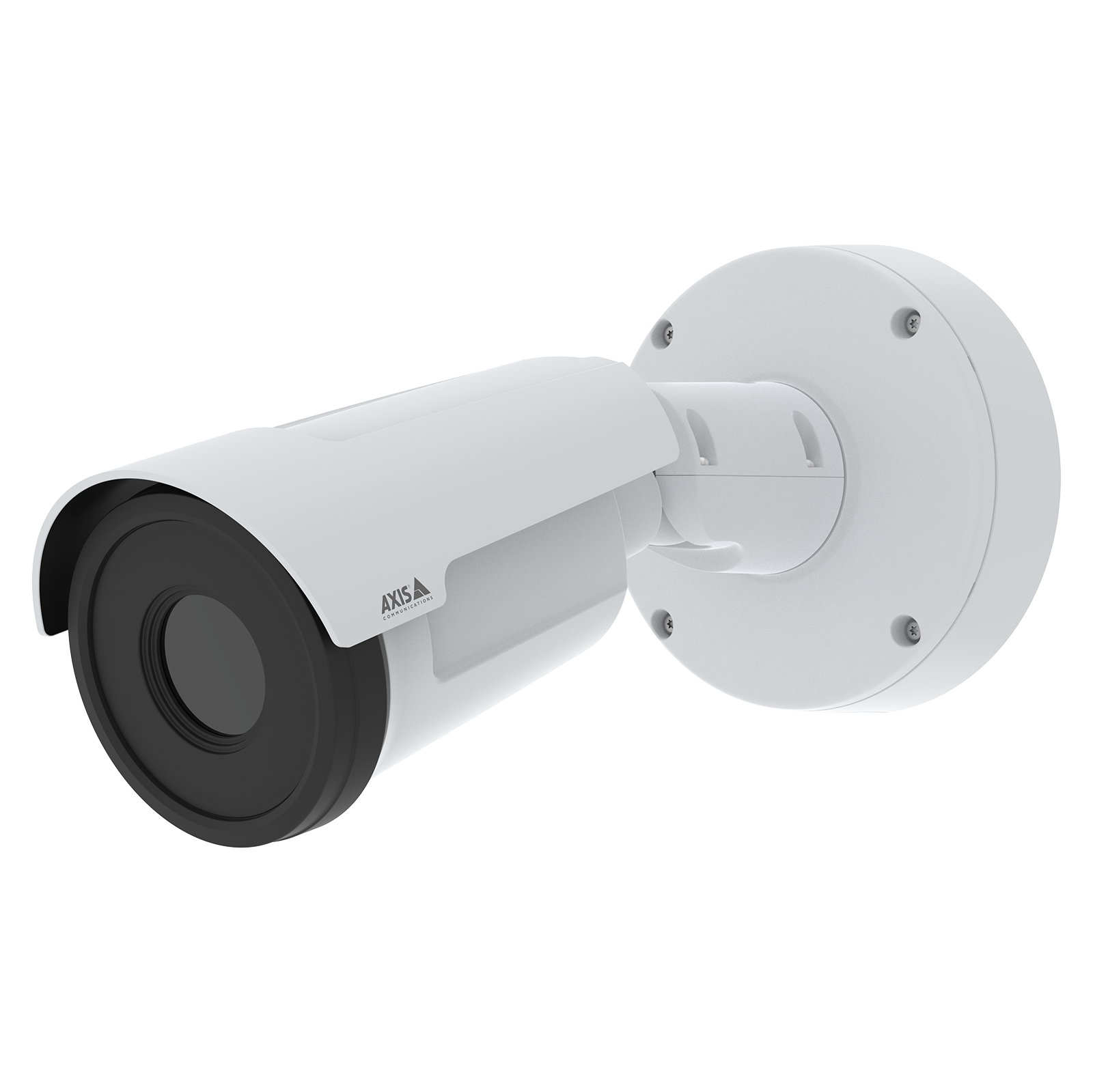
Detect attendance, PPE and hazards.
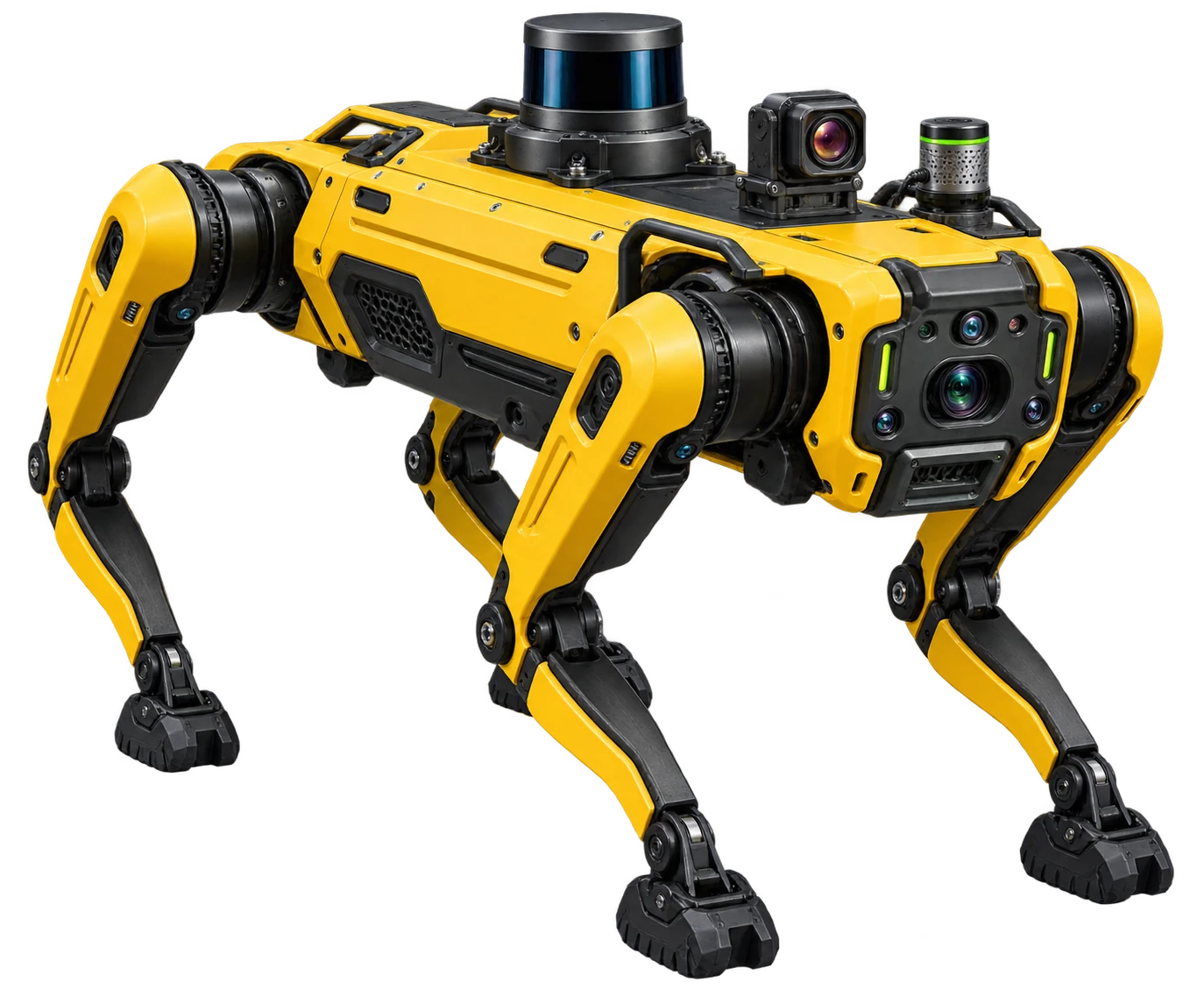
Repeat indoor inspections.
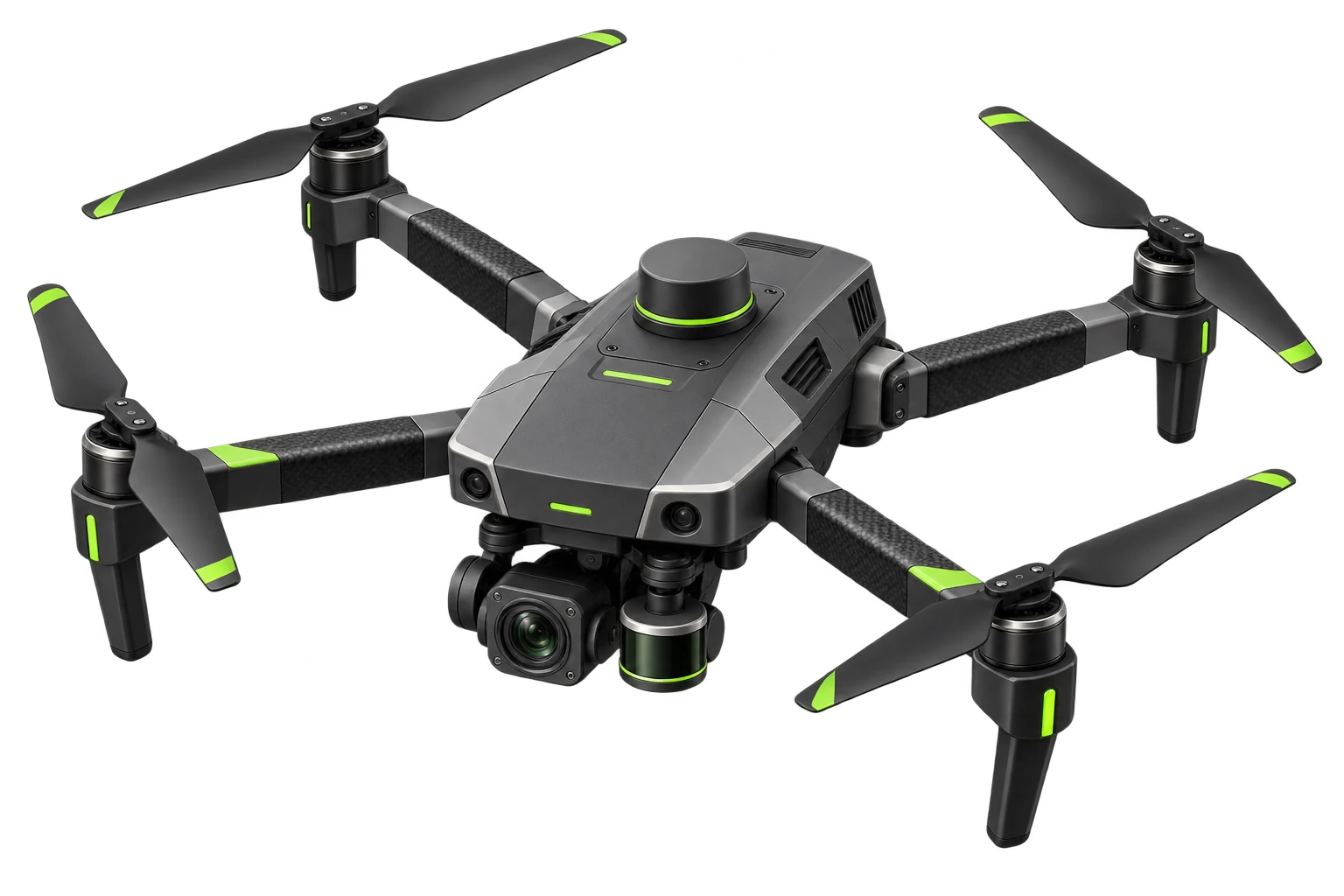
Survey roofs, façades and earthworks.

Rehearse high-risk work safely.
 PART FOUR · EXTERNAL INTELLIGENCE
SECTION 04
04A premium website, a newsletter engine, channel-specific social content and a communications command centre.
EXTERNAL INTELLIGENCE · DIGITAL PRESENCEWEBSITE TRANSFORMATION
A complete redesign presents projects, sectors, services and leadership with the same clarity expected from the organisation's engineering work.
WEBSITE · PROJECT INTELLIGENCESEARCH THE APPROVED PUBLIC RECORD
Projects can be filtered by sector, location, type, status and Saffarini service. An AI assistant answers only from information approved for public use.
“Show Saffarini's healthcare projects in the UAE.”
ANSWERRelevant projects, services and contact route, with links to the approved project pages.
WEBSITE · FOUNDATIONTHE PLATFORM BEHIND THE PORTFOLIO
The redesign includes the work that clients do not see directly, but feel through speed, clarity and trust.
WEBSITE · CONTROLLED PUBLISHINGAUTOMATED PROJECT AND COMPANY UPDATES
The system drafts the page, selects approved assets and prepares metadata. A communications owner reviews every item before release.
 SAFFARINI COMMUNICATIONS AI
ONE APPROVED STORY · EACH CHANNEL ADAPTED
A project milestone enters once. The system prepares the website update, newsletter article, social versions and visual-production brief.
NEWSLETTER · PREPARATION
NEWSLETTER · AUDIENCE SEGMENTATIONTHE STORY STAYS TRUE · THE FORMAT CHANGES
CLIENTSSector capability, project significance and a clear enquiry route
GOVERNMENTInstitutional achievements and major project updates
PARTNERSRelevant delivery news and technical milestones
EMPLOYEESInternal recognition, appointments and company updates
SOCIAL MEDIA · PLATFORM-SPECIFICONE APPROVED STORY · DIFFERENT EDITORIAL JOBS
CONTENT CALENDAR · PRODUCTIONSAFFARINI DIGITAL MEDIA FACTORY
The calendar balances projects, people, engineering knowledge, recruitment, events and company history. It flags repetition and proposes the next useful story.
AI prepares the first production layer with approved templates. The communications team chooses what moves forward.
LISTEN · PRIORITISE · RESPONDREPUTATION AND ENGAGEMENT INTELLIGENCE
Authorised sources surface brand mentions, project questions, media coverage and potential reputation issues for human response.
4items scheduled
2awaiting approval
5responses need an owner
1potential reputation issue
Illustrative interface and counts
CENTRAL COMMUNICATIONS COMMAND CENTRECONTROLLED EXTERNAL INTELLIGENCE
The communications layer receives approved company information, adapts it, requests approval and records performance.
INTEGRATION COMPATIBILITY · DISCOVERY FIRSTCONNECT BEFORE REPLACING
The pilot begins with approved APIs, governed file flows and existing permissions. Final compatibility depends on Saffarini's licenses, access and portal rules.
 APPROVED CONNECTIONIdentity · permissions · project boundary
 PART FIVE · TENDERING
SECTION 05
05Thousands of pages become one controlled workspace, with every requirement owned and audited.
TENDER INTELLIGENCE · COMPLETE PACKAGERFP · DRAWINGS · BOQ · CONTRACT · FORMS
The system structures the package before any draft begins, so each requirement retains its source and owner.
TENDER INTELLIGENCE · STEP 01AUTOMATIC DECOMPOSITION
The agent extracts deadlines, deliverables, eligibility, staffing, certifications, bonds, contractual risks and clarification points.
TENDER INTELLIGENCE · STEP 02COMPLIANCE MATRIX AND FINAL AUDIT
Missing documents, unanswered requirements, conflicting figures and pending approvals remain visible until the authorised team resolves them.
 PART SIX · ENGINEERING CONTROL
SECTION 06
06Drawing review, BIM in plain language, permit conditions and variation control, with the engineer in charge.
DESIGN INTELLIGENCE · ENGINEER CONTROLDRAWINGS · SPECIFICATIONS · SUBMITTALS
The agent pre-screens the package, finds missing information and links every proposed comment to its source. The engineer keeps the decision.
 Issued drawing
 Specification
 Submittal package
 AI PRE-SCREEN
Checks completeness, specification alignment and drawing coordination.
DRAWING REVIEW · CASE USEDESIGN COORDINATION FUNCTION
OUTPUTDraft RFI with the affected drawing, specification clause and location.
 BIM + CONVERSATIONAL AI
ASK THE MODEL IN PROJECT LANGUAGE
The AI layer searches approved model data and coordination records. BIM tools and qualified designers remain in control.
Show unresolved clashes affecting Zone C.
Which rooms miss the specified area?
What changed in the last coordination cycle?
PERMIT AND NOC CONDITION CONTROLCONDITION · DISCIPLINE · DEADLINE · PROOF
The agent extracts conditions from the received letter, maps each one to the responsible discipline and monitors the evidence needed for closure.
CONDITION LETTERConditions extracted with page links PERMIT TRACKER · CASE USE
AUTHORITY RESPONSE FUNCTION
OUTPUTEach condition retains its owner, deadline and closure evidence.
POST-AWARD OBLIGATION CONTROLINSTRUCTION · CLAUSE · IMPACT · APPROVAL
The agent links the instruction to the relevant clause, assembles the available cost and programme evidence, and prepares a variation record for review.
01SITE INSTRUCTIONChange and supporting evidence 02CLAUSE CHECKEntitlement and notice deadline
 03IMPACT PACKTime and cost for human review
 VARIATION CONTROL · CASE USE
CONTRACT ADMINISTRATION FUNCTION
OUTPUTVariation file with the instruction, clause, dates, evidence and decision.
 PART SEVEN · DELIVERY
SECTION 07
07Verified progress, meeting intelligence, the digital twin, handover readiness and one portfolio view.
PROJECT SUPERVISION · VERIFIED REPORTINGPROJECT SUPERVISION FUNCTION
OUTPUTProgress record with date, location, evidence and approved status.
PROJECT AI AGENT · MEETING CONTROLPROJECT INFORMATION STAYS TRACEABLE
The project agent reads authorised contracts, drawings, programme, RFIs, submittals, correspondence and minutes.
 DIGITAL TWIN INTELLIGENCE
MODEL + PROGRAMME + FIELD EVIDENCE
Approved BIM, schedule, documents, inspections, imagery and sensor information meet around the same location.
“Show floors where actual progress is behind plan and the unresolved MEP issues affecting them.”
HANDOVER AI · COMPLETENESS BEFORE CLOSEOUTTHE LAST PROJECT PHASE STAYS MEASURABLE
The agent checks snagging, as-built information, O&M manuals, warranties, testing records and the asset register.
7 warranties missing
3 commissioning certificates
2 as-built drawings
14 asset records
MULTI-PROJECT HQ VIEW · THE SAFFARINI CONSOLETOWERS · COMMERCIAL · VILLAS · ONE SCREEN
High-rise, commercial or private villa: the same console shows progress against plan, the field findings from cameras, robot and drone, who is on site through the mobile app, and the decisions waiting for leadership.
SAME RECORD, ANY SCALEA 60-storey tower and a single villa report in the same format
EVIDENCE, NOT OPINIONThis morning's findings with photo, location, owner and closure proof
DECISIONS SURFACE THEMSELVESOverdue decisions sit at the top until someone acts
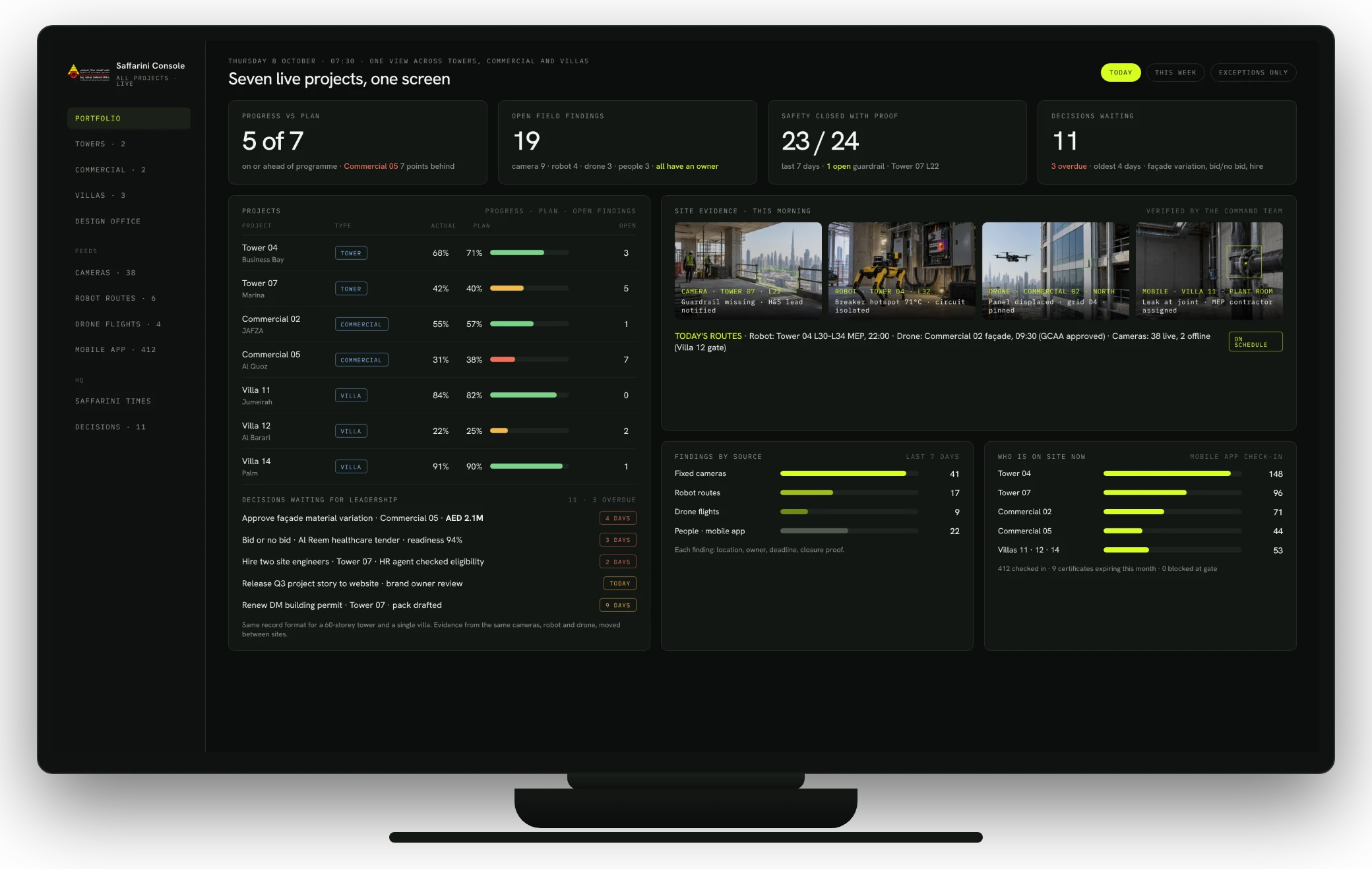 MULTI-PROJECT HQ VIEW
LEADERSHIP REPORTING FUNCTION
OUTPUTOne list of overdue decisions, organised by project and owner.
 PART EIGHT · THE APP
SECTION 08
08One application on every phone: login and check-in, a work log for every level of worker, tracking and approvals for managers.
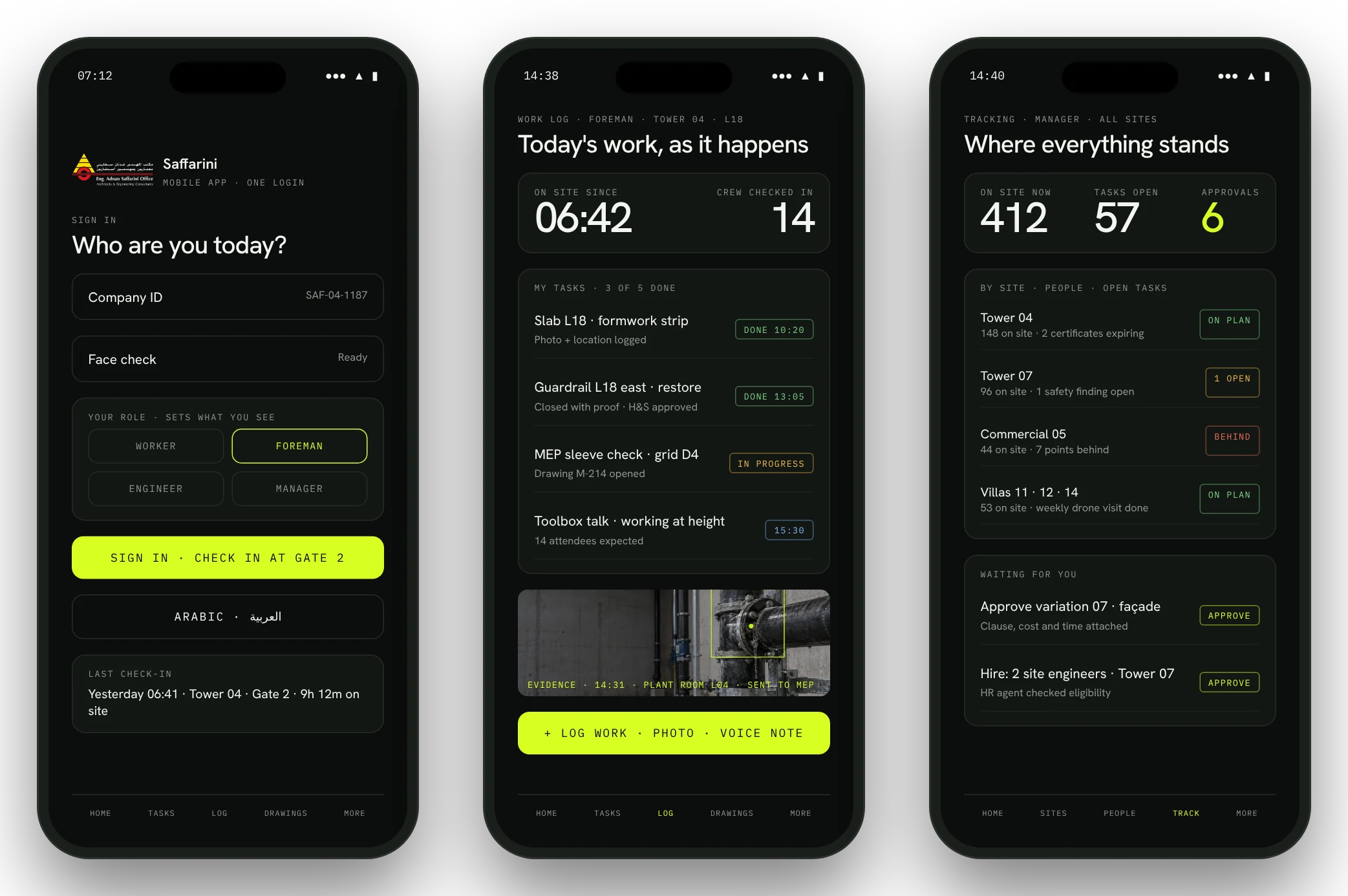
SAFFARINI MOBILE APP · OFFICE AND SITETHE SAFFARINI MOBILE APP · LIVE WORK · ONE CONTROLLED RECORD
One application on every employee's phone. Office and construction teams see assigned work, drawings, safety actions, approvals and evidence from the same secure workspace.
SAFFARINI MOBILE APP · LOGIN · WORK LOG · TRACKINGONE APP · WORKER TO EXECUTIVE
Each person signs in with their company ID and a face check; their role decides what they see. Workers and foremen log work, photos and hours as they happen. Engineers and managers track every site and approve from their phone.
LOGIN AND CHECK-INCompany ID plus face check at the gate; hours and certificates follow the person
WORK LOGTasks, photos, voice notes and evidence, logged on the spot and tied to the drawing
TRACKING AND APPROVALSWho is on site, what is open, what needs a signature, across all projects
 SAFFARINI MOBILE APP · CASE USE
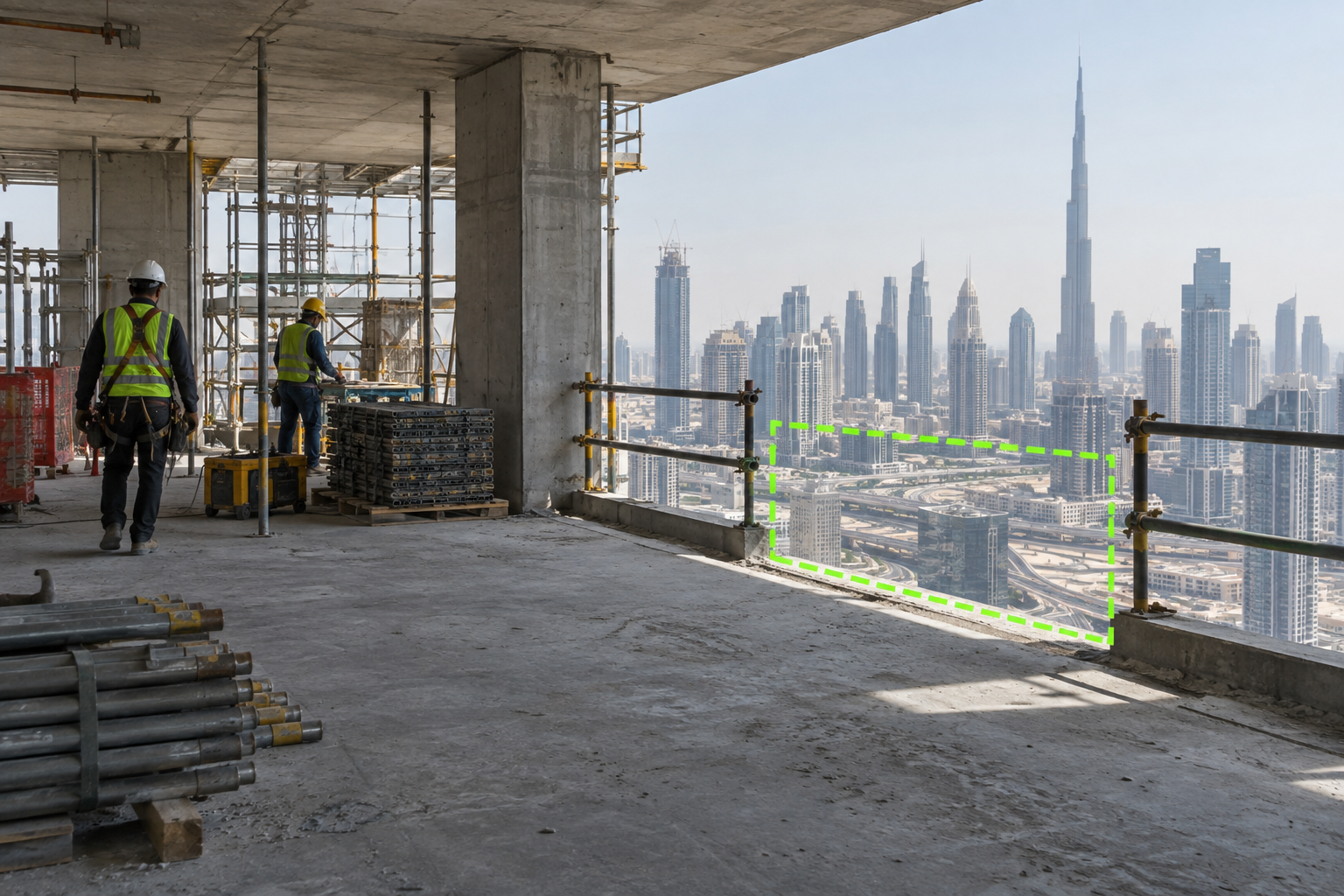
ONE TASK · SITE TO OFFICE
The engineer records the location, photo and drawing reference. The responsible office team receives the task, responds and returns the approved instruction.
01 CAPTUREPhoto, location, voice note and drawing
02 ASSIGNOwner, priority and response deadline
03 RESOLVEInstruction, evidence and approval
04 CLOSECompleted work remains in the project record
 PART NINE · THE FIELD
SECTION 09
09VR training, cameras, the robot dog and the drone, reusable across towers, commercial sites and villas, and one live queue for every finding.
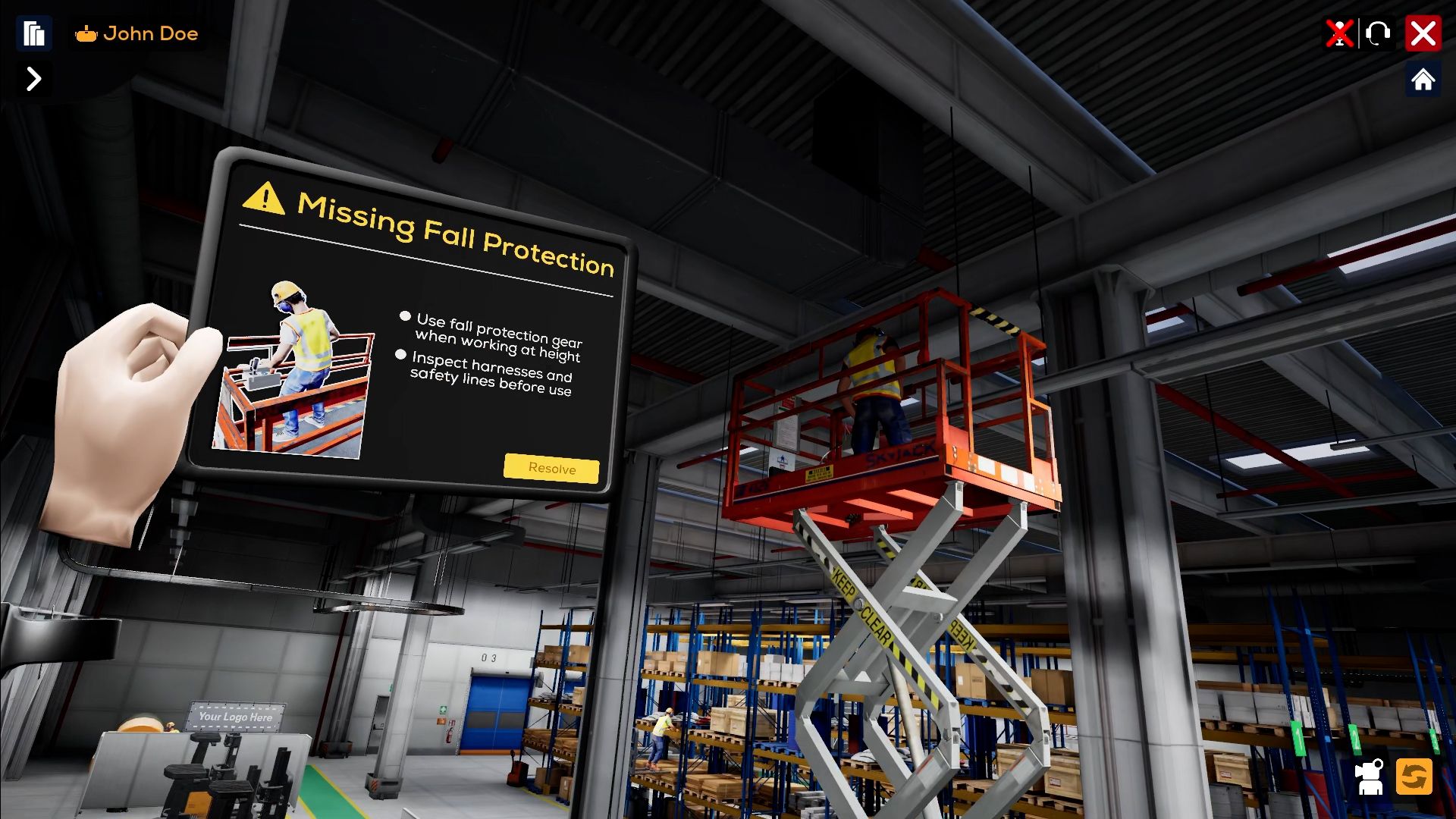
ONEBONSAI VR TRAININGCONSTRUCTION SAFETY TRAINING
This OneBonsai simulation asks the trainee to spot missing fall protection and choose the correct response inside a realistic work environment.
 CONSTRUCTION · FIELD INTELLIGENCE
EACH DEVICE HAS ONE CLEAR JOB
The equipment stays modular. Every verified finding enters the same project record.
CCTV + VISIONContinuous zones for attendance, PPE and hazards.
ROBOT DOGRepeatable indoor routes with cameras, thermal and 3D scanning.
SMART DRONEApproved aerial routes for roofs, façades and earthworks.
 MOBILE CAPTURE
Targeted evidence from the engineer already on site.
FIELD EQUIPMENT · REUSABLE ACROSS THE PORTFOLIOBUY ONCE · DEPLOY ON EVERY SITE
The cameras, the robot and the drone are not tied to one site. They move with the programme, from a tower to a commercial development to a private villa, and the cost is spread across the whole portfolio.
Fixed cameras on gates and cores. The robot repeats floor-by-floor MEP routes. The drone surveys the façade and crane zones on an approved route.
Evidence per floor, per dayCameras cover yards and loading bays. The robot scans large slabs and plant rooms. The drone tracks earthworks, roofs and car parks.
Progress against programme, verifiedOne camera and a weekly robot or drone visit are enough. The same record format, the same close-out proof, at villa scale.
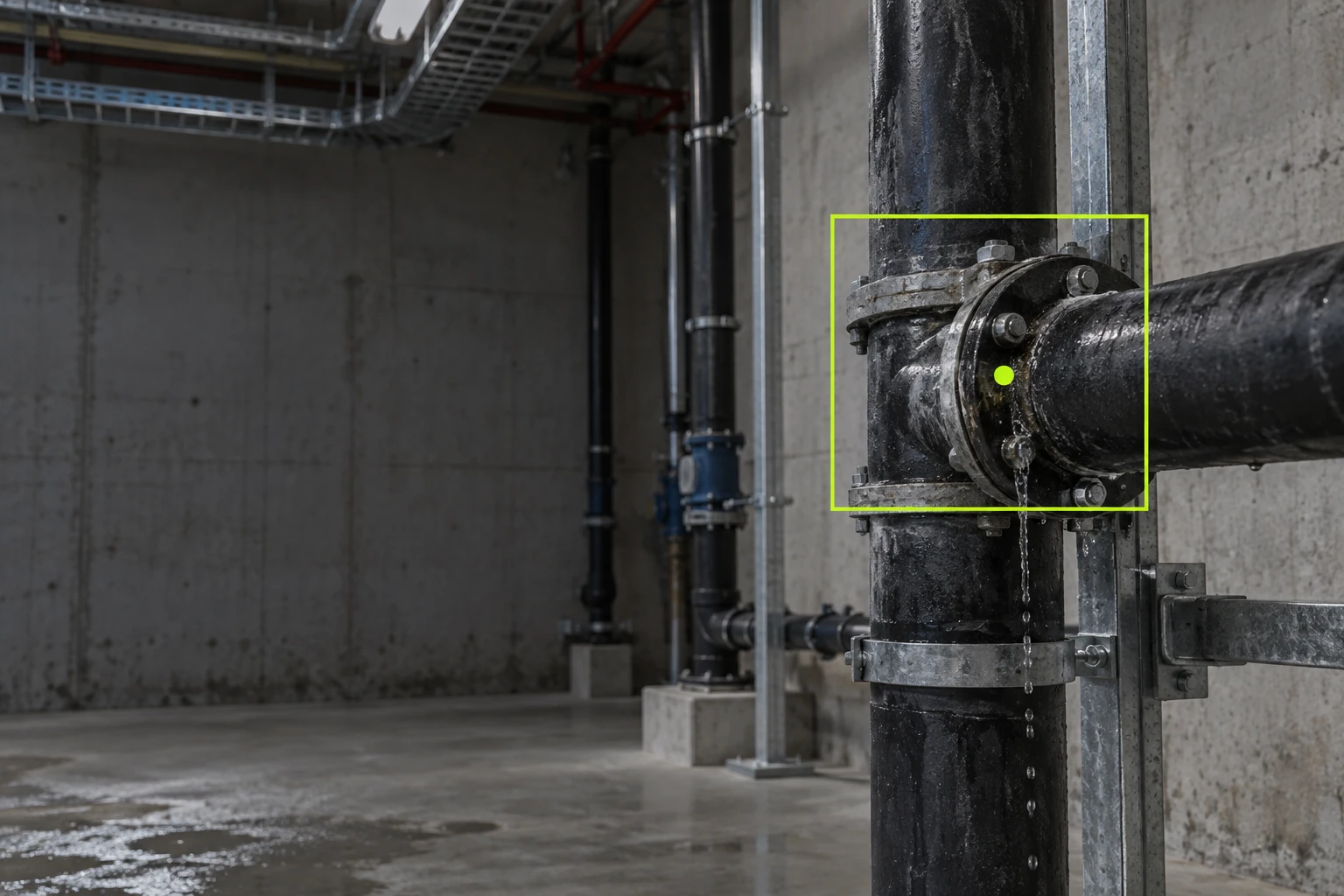
Light-touch, same standardFIELD INSPECTION · CASE USEDEFECT DETECTION AND CLOSE-OUT
A camera or inspection robot records the leak, its exact location and the repair evidence required for closure.
 VISION AI · CASE USE
FALL-RISK DETECTION
A fixed camera flags a missing guardrail section, identifies the responsible zone and starts a controlled close-out.
ROBOT INSPECTION · CASE USETHERMAL ANOMALY DETECTION
A robot repeats the same MEP route and records abnormal heat before a person enters the service area.
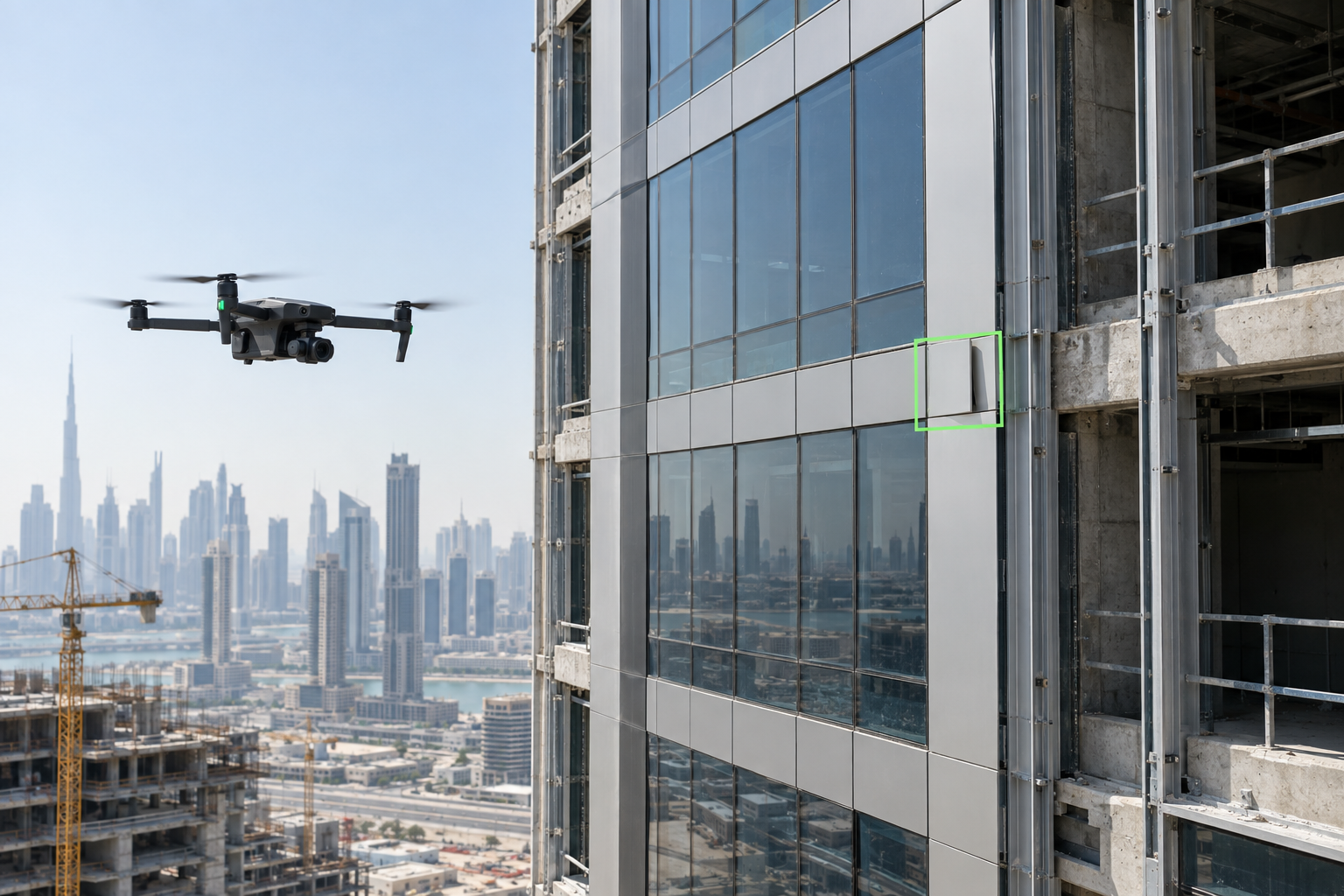
 DRONE INSPECTION · CASE USE
EXTERNAL ENVELOPE CHECK
An approved drone route records the elevation and pins one displaced panel to its grid location for engineering review.
 TECHNICAL COMMAND CENTER · CONNECTED MODEL
ONE LIVE QUEUE FOR FIELD FINDINGS
Camera, drone, robot and people create the same verified event. The command team assigns it once, and the decision returns through the right channel.
CAMERAPPE event · Gate 2ASSIGNED
ROBOTWall variance · L08REVIEW
DRONEFaçade pin · Grid D4OPEN
PART TEN · GOVERNANCESECTION 10
10What the system must respect, how the data boundary is agreed, and the seven-phase route to scale.
INTERNATIONAL + DUBAI BENCHMARKWHAT THE SYSTEM MUST SUPPORT
The technology strengthens inspection and evidence. It does not replace the consultant, contractor duties or statutory approval.
“The top four causes of construction fatalities are falls, struck-by, caught-in/between and electrocutions.”OSHA Construction Hazards Quick Card
DOCUMENTED INTERNATIONAL ADOPTIONTHE TECHNOLOGY FAMILY IS ALREADY IN USE
Their pattern is consistent: capture the site, compare it with project information, assign the finding and keep the evidence.
“This technology helps improve safety and quality of project delivery by providing real-time data and analysis to project teams.”Mike Lewis, Bechtel · official UAS announcement
DATA SECURITY · GOVERNANCE · PILOT GATETRUST IS A DESIGN DECISION
Saffarini approves where project data sits, who may access it, which services may process it and how long records remain.
Named users, defined roles and least-privilege access.
Only approved folders, models and records enter the pilot boundary.
The selected deployment and model provider require security and legal approval.
Sources, agent output, human decisions and changes remain traceable.
DELIVERY ROADMAP · DISCOVER BEFORE SCALINGCONTROLLED TRANSFORMATION
Each phase produces evidence for the next decision. Successful pilots connect to approved systems only after governance review.
PART ELEVEN · THE DECISIONSECTION 11
11What the gains are worth, which pilot to start with, and exactly what we propose to do next.
THE BUSINESS CASE · INDUSTRY EVIDENCEWHAT THIS IS WORTH TO SAFFARINI
Published results from digitised engineering and construction work, and what the same ratios mean when applied to one Saffarini team or project.
Documented on one project team after workflows were digitised and reports automated.
McKinsey, Imagining construction's digital future, 2016Time to generate project reports cut by three quarters once data entered once and flowed through.
McKinsey, 2016Engineering-function productivity gain reported from advanced analytics on project data.
McKinsey, 2016Total cost of avoidable error in construction, including rework, latent defects and indirect cost.
Get It Right Initiative, Call to Action, 2016≈1,000 ha year returned to one six-person tender team at 20 staff-hours a week over 50 working weeks
4 h → 1 hfor every weekly project report, across every active project, at the documented 75% reduction
AED 1Mprotected on a AED 100M project for every one percentage point of error avoided, against a 10–25% industry baseline
Ratios from the cited studies applied to example Saffarini team sizes and project values. Not measured Saffarini results; the Phase Zero baseline replaces these with Saffarini's own numbers.ONE DECISION TO STARTFOUR PRACTICAL STARTING POINTS
Each pilot has one owner, one approval boundary and a measurable before-and-after process.
THE PATH FORWARD · WHAT WE PROPOSE TO DOOUR PLAN OF ACTION
One half-day with Saffarini leadership. Choose the first pilot, name the workflow owner and the sponsor, agree the data boundary.
OUTPUT · signed pilot charterWe map the chosen workflow end to end: inputs, decisions, systems, access. We measure today's baseline so the gain can be proven.
OUTPUT · blueprint, integration map, security model, baselineThe agent runs on real Saffarini work with the named owner approving every output. We train the team and tune weekly.
OUTPUT · working process, trained owner, audit trailBefore-and-after evidence goes to leadership with the next two workflows priced and sequenced. Saffarini decides to expand, revise or stop.
OUTPUT · measured result, scale planONEBONSAI GULF × SAFFARINI FAMILYTHE FIRST ENGAGEMENT
The first engagement leaves Saffarini with a working process, trained owners, approved controls and evidence of the result. The same controlled intelligence can later serve operations, project delivery and external communications.
Open the extended capability appendix